


How to Reduce Compatibility Risks When Replacing or Expanding a Modular UPS

Compatibility risk in modular ups systems comes from five areas: frame and module generation, firmware and communication protocols, power and bypass ratings, battery and DC bus matching, and site conditions such as cabling, cooling and load growth. The most reliable way to reduce it is a documented pre-expansion audit, written confirmation of module and frame compatibility from the manufacturer, a firmware alignment plan, a battery review, and staged commissioning with load testing. Replacing the whole frame is often safer than forcing mixed-generation modules into an aging cabinet. Treating the UPS, batteries and any solar or energy storage layer as one power chain also cuts the number of surprises on the day of cutover.
Understanding Compatibility Risks in Modular UPS Upgrades
In my 15 years working with power protection projects, most failed expansions had the same cause. Someone assumed a new module would behave exactly like the old ones. Modular designs are flexible, and that flexibility makes people overconfident. A uninterruptible power supply protects critical loads from mains disturbances, but only if every component in the chain cooperates. Below are the three traps I see most often.
Why Same Model Does Not Mean Same Hardware
A model name on a datasheet can hide several hardware revisions. Over a product's life, manufacturers change control boards, fans, capacitors, and sometimes the internal communication bus. A module bought five years after the frame may carry the same rating label and still differ in how it shares current or reports faults. I always ask for the hardware revision and serial range of both the frame and the module, and I request written confirmation that they are interoperable. A verbal assurance from a sales rep is not enough.
The Hidden Role of Firmware and Communication Protocols
Firmware is where many hidden conflicts live. Modules in a parallel system must agree on synchronization, load sharing, alarm thresholds and bypass logic. If one module runs a newer firmware branch, you can see nuisance alarms, uneven load distribution, or in the worst case a module that refuses to join the system. I also check the monitoring layer. If your building management system or DCIM tool reads data through SNMP or Modbus, a firmware change may alter register maps. Test these integrations before the new hardware goes live.
Electrical Interfaces: Frame, Bus, and Bypass Limits
Every frame has a maximum capacity, and the static bypass, busbars, breakers and input cabling are often sized for that maximum, but not always. I have seen sites where the frame could hold six modules while the upstream breaker and cable only supported four. Expanding without checking those limits creates a hidden bottleneck. Review short-circuit ratings, selectivity with upstream protection, and the neutral and grounding arrangement. The International Electrotechnical Commission publishes the UPS performance and safety standards, including the IEC 62040 series. Ask any supplier to show which parts of the series their equipment is tested against.
A Pre-Expansion Audit I Run Before Ordering Any Module
Before I recommend any purchase, I run a structured audit. It takes a few days, and it has saved clients from far more expensive mistakes. The audit has three parts.
Document the Installed Base
I start with a complete inventory: frame model and serial number, module count, firmware versions, last service date, battery age, and the one-line diagram. I also pull the event logs. Repeated module faults, fan warnings or bypass transfers tell me whether the existing system is healthy enough to expand. Adding new capacity to a unit with chronic faults only spreads the problem. If the vendor has announced end-of-life for the platform, that goes at the top of my report, because spare modules may become scarce.
Test the Load Profile and Growth Assumptions
Next, I measure the real load over at least a full business cycle, not just the nameplate. Many operators overestimate the load, then buy more capacity than needed. Others forget that new IT or industrial equipment arrives with a different power factor and harmonic profile. I compare measured load against N+1 redundancy so that the system can lose one module and still carry the critical load. Right-sizing also improves efficiency, because lightly loaded modules tend to operate less efficiently. Guidance from groups such as the Uptime Institute is a useful reference when you are weighing redundancy against cost.
Check Battery Compatibility and Runtime Targets
Batteries are the most overlooked compatibility factor. Different chemistries, ages and string voltages should not be mixed casually. A lead acid battery string degrades with temperature and cycling, so a fresh module connected to an old string may deliver far less runtime than the spec implies. I verify the DC voltage window, charger current limits, and whether the modules share a common battery or use separate strings. If runtime is a contractual requirement, I recalculate it for the new load, not the old one.
Replacement and Expansion Strategies That Lower Risk
Once the audit is complete, the decision is between adding modules, replacing modules, or replacing the entire frame. Each path has a different risk profile, and I walk clients through the trade-offs honestly.
Hot-Swap Discipline and Staged Commissioning
Hot-swappable modules are a real advantage, but they do not remove the need for process. My rules are simple. First, I schedule work in a low-risk window and confirm the bypass path is healthy. Second, I update firmware on the new module in a bench or isolated setting before it joins the live system. Third, I add one module at a time, then observe load sharing, temperature and alarms before moving on. Fourth, I run a load bank test and a simulated mains failure whenever the site permits it. Keep the old module and its configuration notes until the new setup has run stably for a few weeks.
When to Replace the Frame Instead of Adding Modules
Sometimes the honest answer is that expansion is not worth it. If the frame is near end-of-life, the busbars are at their limit, or the platform no longer receives firmware support, I advise a full replacement. A new system lets you choose a current architecture, align every component, and reset the warranty clock. The upfront cost is higher, but it removes the long-term compatibility burden. The table below summarizes how I compare the options.
| Upgrade Path | Compatibility Risk | Typical Downtime Exposure | Best Fit |
|---|---|---|---|
| Add identical module to existing frame | Low if hardware revision and firmware match | Minimal with hot-swap procedure | Healthy frame with spare slots and verified upstream capacity |
| Add newer-generation module to older frame | Medium to high; firmware, bus and sharing logic must be confirmed in writing | Moderate; extra testing required | Only when the manufacturer certifies mixed operation |
| Replace all modules in the existing frame | Medium; frame, bypass and controls remain old | Moderate | Frame is sound, but modules are failing |
| Replace the full modular UPS | Lowest long-term; new interfaces must be engineered | Planned cutover, often with temporary bypass | End-of-life platform or major capacity growth |
| Parallel a second independent UPS | Low electrical coupling; needs distribution redesign | Low during installation | Sites that need added redundancy without touching the old system |
Whichever route you pick, ask for a compatibility statement signed by the manufacturer or an authorized partner. If they will not put it in writing, treat that as a warning sign.
Why I Pair Modular UPS Planning with Our Power Solutions
Over the years I have learned that a UPS rarely fails alone. It fails as part of a power chain that includes batteries, distribution, generators, and increasingly solar and storage. That is why our team supports clients across the whole chain rather than selling a single box. The scope of our offering covers the uninterruptible power supply, the batteries behind it, and the renewable and storage equipment that now sits alongside it.
Batteries and Energy Storage Integration
Our engineers help customers match battery strings to the UPS design, whether that means a proven lead acid battery bank or a move toward modern energy storage systems. When a site wants to cut peak demand or ride through longer outages, an energy storage inverter and a well-sized inverter energy storage setup can complement the UPS instead of competing with it. The UPS handles instant transfer and power conditioning, while storage supports longer-duration needs. Designing both together avoids the DC voltage and control mismatches that I described earlier.
Outdoor and Solar-Linked Scenarios
Not every critical load sits in a climate-controlled data hall. Telecom shelters, remote monitoring stations, construction sites and field operations need an outdoor power supply or an outdoor uninterruptible power supply that tolerates dust, moisture and wide temperature swings. For sites with sunlight and unreliable grid power, a solar inverter combined with a Solar Energy Storage System can cut fuel use and keep essential equipment running. I recommend these setups when a client asks how to expand resilience without enlarging the main UPS frame. As with any modular platform, I verify voltage ranges, communication protocols and protection coordination during design, not after delivery.
My advice is to treat compatibility as a project discipline instead of a last-minute check. Audit the installed base, confirm firmware and frame interoperability in writing, size the batteries to the new load, commission in stages, and replace the frame when expansion no longer makes sense. If you want a second opinion on a planned upgrade, our team can review your configuration and recommend the lowest-risk path across UPS, batteries, solar and storage.
Contact us today to have our engineers review your modular UPS upgrade plan and explore our uninterruptible power supply, solar inverter and energy storage solutions.
Frequently Asked Questions
Can I mix old and new modules in the same modular UPS frame?
Sometimes, but only when the manufacturer confirms in writing that the hardware revisions and firmware versions are interoperable. Mixed generations can cause uneven load sharing, nuisance alarms or a module that will not join the system, so I always insist on documented approval and staged testing.
How do I know if my modular UPS frame can support more modules?
Check the frame's rated maximum, then verify the upstream breaker, input and output cabling, busbars, static bypass and short-circuit ratings. The frame may physically accept more modules than the surrounding electrical infrastructure can safely support.
Do I need to update firmware before adding a new UPS module?
In most cases, yes. Align the new module's firmware with the installed system, ideally on a bench or in an isolated setting, before it goes live. Also retest monitoring integrations such as SNMP or Modbus, because register maps can change between versions.
Can I connect new modules to old batteries?
It is possible, but not always wise. Old battery strings have reduced capacity, so runtime may fall short of expectations. Verify the DC voltage window, charger limits and string configuration, and consider replacing aged batteries when you expand.
When should I replace the whole modular UPS instead of expanding it?
Replace the full system when the platform is near end-of-life, firmware or spare parts support is ending, the frame or busbars are at their limit, or the event logs show repeated faults. A full replacement costs more upfront but removes long-term compatibility risk.
Can solar and energy storage systems work alongside a modular UPS?
Yes. The UPS provides instant transfer and power conditioning, while a solar inverter, energy storage inverter and storage system can support longer-duration needs or reduce grid dependence. The key is to coordinate voltages, controls and protection during the design stage.
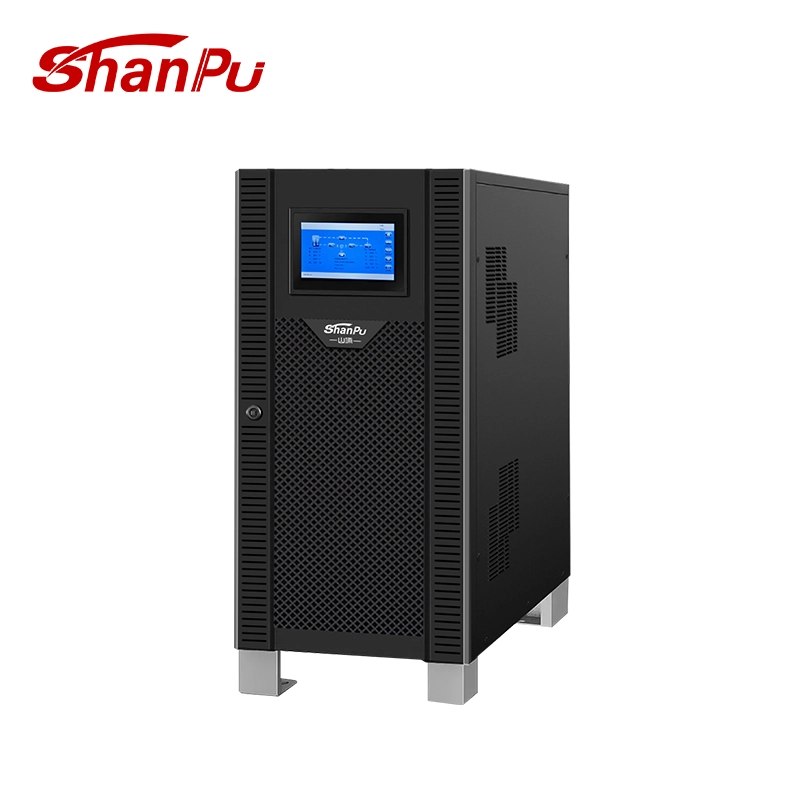
-
ShanPu 3C33 10-800kVA three-phase industrial UPS is a low-frequency UPS with transformer-based online double conversion for factories and plants. Equipment, automation and control loads stay online through grid disturbance and outage with 0ms transfer.
- Rated 10-800kVA with three-phase input and output at 380/400/415Vac, the 3C33 scales from single machines to full production lines. A low-frequency isolation transformer blocks surge, harmonic and common-mode disturbance before reaching PLCs and drives; microprocessor control keeps output within ±1% across a 304-456Vac input window. External VRLA banks size backup time to the process.
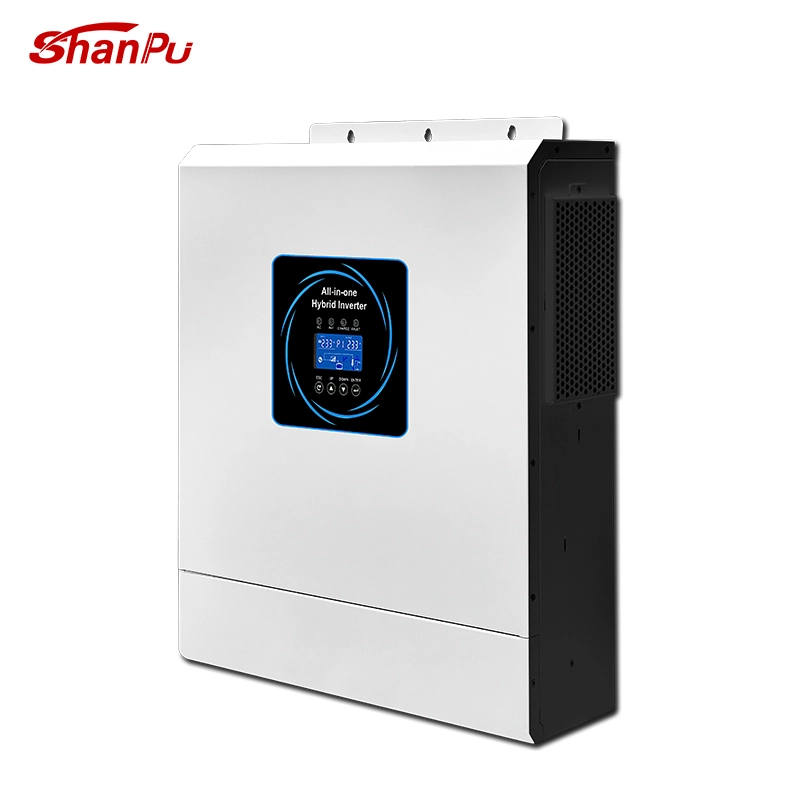
ShanPu SP-12KW/48V is an all-in-one hybrid inverter that integrates dual MPPT solar charging, 48V battery management and dual-output DC-to-AC inversion in one unit for large residential, commercial and light industrial storage systems. Two independent MPPT channels harvest power from separate PV arrays and convert it into regulated 48V DC, charging the battery bank at up to 160A while feeding the inverter stage; the controller automatically selects between solar, utility and battery based on the configured priority mode (SUB / SBU / SUF).The dual AC output design separates critical loads from non-critical circuits, while the 160A MPPT charging current and up to 160A AC charging rapidly recharge 48V battery banks after prolonged cloudy periods or heavy discharge. The 48V architecture reduces line losses and supports higher power delivery, and the Pro model adds parallel expansion plus optional WiFi monitoring for larger projects.
ShanPu SP-3.6KW/24V is an all-in-one hybrid inverter that combines a 100A MPPT solar charger, 24V battery management and DC-to-AC inversion in one compact unit. Built for residential and small commercial systems, it delivers reliable power management with efficient energy conversion and straightforward installation.The inverter supports up to 5000W PV array power with a 60-500Vdc MPPT tracking range and up to 96% peak conversion efficiency from PV to AC. It can also run directly from solar PV or utility without a battery connected, and RS485 communication with automatic lithium battery activation makes LiFePO4 integration straightforward.
ShanPu SP-6.2KW/48V is an all-in-one hybrid inverter that integrates MPPT solar charging, 48V battery management and DC-to-AC inversion into a single unit for medium residential and small commercial storage systems. Solar PV power is processed by the MPPT charger and converted into regulated 48V DC, which simultaneously charges the battery bank and supplies the inverter stage, while the built-in controller automatically selects the energy source - solar, utility or battery - based on the configured operating mode.
© 2026 ShanPu. All Rights Reserved.
YouTube
SHANPU UPS
Shanpu