


Mini DC UPS Sizing Guide for Multi-Device Installations

A mini DC UPS for a multi-device installation should be sized from the actual load at its output, the required backup duration, and the compatibility needs of every connected device—not from battery capacity alone. Buyers should total device watts, verify voltage and polarity, allow for conversion losses and startup peaks, then select a battery capacity that covers the calculated energy demand with a practical reserve. This guide explains a repeatable sizing method, compares illustrative runtime scenarios, and identifies procurement checks for network equipment, cameras, access systems, and other low-voltage electronics.
How to size a compact DC backup system for several devices
Build a verified load inventory
Start by listing every device that must remain online during an outage: modem, router, optical network terminal, wireless access point, security camera, recorder, access controller, or sensor hub. Record each unit’s required input voltage, maximum or rated current, connector type, polarity, and whether it uses a barrel jack, USB, or another DC interface. The equipment label and manufacturer’s datasheet are more useful than a generic online estimate because product variants can have different power requirements.
For a DC device, estimate input power with the relationship watts = volts × amps. If a 12 V device is rated at 1 A, its stated maximum input power is 12 W. Add the power of all devices expected to operate simultaneously. Where equipment is labeled in watts, use that figure directly and check whether it represents typical consumption or a maximum. For network devices, PoE loads should be considered at the power source as well as at the powered device because cable and conversion losses affect the upstream requirement.
Do not size from an average load if the installation must support peak operation. Infrared illuminators, camera pan-tilt-zoom motors, radio transmitters, storage drives, and devices booting after an outage may briefly draw more current than their steady-state consumption. Ask equipment suppliers for startup or peak input figures when available. If those figures are unavailable, test the complete installation under its highest expected operating condition and use the measured input rather than assuming every device runs at its idle level.
Calculate backup energy and runtime
Convert the combined load into energy demand by multiplying watts by the required hours of autonomy. A 20 W installation that must operate for four hours needs 80 Wh delivered to the loads, before allowing for conversion losses or reserve. The battery’s nominal energy is commonly estimated as battery voltage multiplied by amp-hour capacity: a nominal 12 V, 7 Ah battery represents 84 Wh on paper. That nominal figure does not mean 84 Wh will necessarily be available at the output under the actual discharge rate and operating conditions.
Include the efficiency of voltage conversion, the battery’s usable discharge range, age, temperature, and the manufacturer’s discharge specifications. For an early planning estimate, a project may apply explicit assumptions—for example, 80% usable battery energy and 85% conversion efficiency—then validate the result against the selected product’s datasheet. Under those assumptions, 84 Wh nominal provides an estimated 57 Wh for connected loads (84 × 0.80 × 0.85). This is a planning example, not a universal performance guarantee. Battery runtime can differ materially by chemistry, temperature, discharge current, and end-of-life criteria.
Use the equation estimated runtime in hours = nominal battery voltage × amp-hour capacity × usable fraction × conversion efficiency ÷ total load in watts. Confirm that the product manufacturer defines capacity and runtime in a way that matches the calculation. A runtime chart measured at a particular load is often more useful than a headline amp-hour rating, especially when comparing compact backup units with different battery chemistries or output configurations.
Check output voltage, current, and connection limits
Before comparing battery sizes, confirm that the backup unit can supply every required voltage at the same time. A system with 5 V USB devices and 12 V networking equipment may need independently regulated outputs, or a compatible DC-DC converter. Check each port’s maximum current and the unit’s total output limit: several ports do not necessarily mean that every port can deliver its individual maximum simultaneously.
Verify connector dimensions and polarity rather than relying on appearance. A barrel connector that fits may still have the wrong polarity or voltage. Also confirm whether the output remains regulated as the battery discharges and whether the equipment tolerates the unit’s transfer behavior when utility power fails or returns. For USB-C devices, the required voltage and power profile should match the backup system’s supported USB Power Delivery capabilities; consult the USB Implementers Forum’s USB Power Delivery information and the device manufacturer’s specifications.
Compare runtime scenarios and validate installation design
Illustrative capacity comparison
The table below compares simple planning scenarios using the same stated assumptions: a nominal 12 V battery, 80% usable energy, and 85% conversion efficiency. The figures are calculations, not product test results. They help buyers compare energy requirements, but they do not replace a manufacturer’s runtime chart or a test of the assembled installation.
| Illustrative battery rating | Nominal energy | Estimated usable output energy | Example total load | Estimated runtime |
|---|---|---|---|---|
| 12 V, 3 Ah | 36 Wh | 24.5 Wh | 8 W | About 3.1 hours |
| 12 V, 7 Ah | 84 Wh | 57.1 Wh | 15 W | About 3.8 hours |
| 12 V, 12 Ah | 144 Wh | 97.9 Wh | 25 W | About 3.9 hours |
These examples show why capacity should be evaluated alongside load: the largest battery in the table does not automatically provide the longest runtime when it supports a substantially higher load. For a real project, substitute measured or datasheet-based load figures, the product’s documented usable capacity, and a realistic end-of-life margin. If service continuity is critical, specify the minimum required runtime at the expected load rather than purchasing to a rounded battery size without validation.
Account for cable loss, placement, and operating conditions
Long or undersized DC cables can create voltage drop between the backup supply and a device, potentially causing instability even when the battery has energy remaining. Keep cable runs appropriately short, use conductors suitable for the current and installation environment, and verify voltage at the device under load. The required conductor and protection depend on circuit current, cable length, installation method, local electrical rules, and manufacturer guidance; a qualified installer should review fixed or safety-critical installations.
Consider the ambient temperature and physical location. A unit installed in a cabinet, outdoor enclosure, or unconditioned communications space may face temperatures outside the battery’s preferred operating range. Temperature can affect available capacity and service life, while dust, moisture, and ventilation conditions may affect the complete system. For outdoor deployments, confirm the enclosure rating and temperature limits for the actual assembled product, not just one component. Products described as outdoor power supplies or outdoor uninterruptible power supplies should be assessed against the site’s exposure and installation requirements.
Operational behavior matters as much as nominal runtime. Check recharge time after an outage, whether the equipment can operate while the battery recharges, how the unit indicates low battery or fault conditions, and whether it restores output automatically after AC power returns. Where the devices provide essential connectivity or security functions, define an alarm or replacement process before installation. Guidance and requirements vary by application; IEC’s IEC 62040-1 standard for UPS safety is a relevant reference for UPS product safety, while the selected equipment’s certification and installation instructions remain essential procurement checks.
Compare backup approaches against the application
A compact DC backup unit can simplify installations where the connected equipment uses compatible low-voltage DC inputs. An AC UPS may be preferable when loads require AC input, when multiple power supplies must be backed up together, or when the installation needs features specific to an AC system. Neither option is automatically superior: buyers should compare conversion stages, usable energy, output compatibility, serviceability, physical footprint, and the consequence of an outage.
| Decision factor | Compact DC backup approach | AC UPS approach |
|---|---|---|
| Typical load connection | Direct DC outputs for compatible equipment | AC outlets for equipment with AC power adapters or AC inputs |
| Voltage compatibility check | Confirm each DC output voltage, polarity, connector, and current limit | Confirm AC voltage, frequency, outlet type, and connected adapter requirements |
| Energy sizing basis | Connected DC load plus conversion and battery-use allowances | Connected AC load plus UPS conversion and battery-use allowances |
| Potential procurement advantage | May avoid an additional AC adapter stage for compatible DC devices | Can serve mixed equipment that requires AC input |
| Key limitation to assess | Output combinations and total DC current may be restricted | Inverter losses, footprint, and runtime at the actual load must be assessed |
This is a functional comparison, not a claim that either architecture always consumes less energy or costs less. Confirm performance using the shortlisted product datasheets and a representative load test. For network installations using Power over Ethernet, review the applicable equipment requirements and the relevant IEEE 802.3 Ethernet standard alongside the switch and endpoint documentation; do not assume that a DC backup output can directly replace a PoE source.
Procurement criteria and product-system fit
Turn the sizing calculation into a purchase specification
A useful request for quotation should state the connected device list, voltage and connector requirements, measured or rated load, required autonomy, expected ambient conditions, and any need for simultaneous output operation. Ask suppliers to provide a runtime curve or test data at the project’s actual load, battery replacement guidance, recharge time, warranty terms, and applicable safety or conformity documentation for the destination market. This makes competing offers easier to compare than a procurement request based only on battery amp-hours.
For multi-device installations, request confirmation of the maximum combined output, per-port current, output regulation, low-voltage cutoff behavior, and response during power transfer. Ask whether the quoted runtime is based on a new battery, a specified temperature, a particular load profile, or a defined battery end point. These details expose assumptions that can otherwise make two apparently similar specifications incomparable. For projects with service-level targets, define the acceptance test in advance and record the load, battery state, temperature, and observed runtime.
Battery selection should reflect maintenance strategy and total ownership cost, not only purchase price. Buyers should compare the specified chemistry, expected replacement interval under the intended conditions, availability of replacement batteries, shipping constraints, and end-of-life handling. Lead acid battery options may suit some established backup designs, while other applications may prioritize different weight, cycle, or packaging characteristics. The selected design must follow the product’s approved battery configuration; replacing a battery type without manufacturer approval can compromise charging, safety, or performance.
Evaluate the wider energy portfolio without over-specifying
Our product portfolio spans solar inverter and Energy Storage Inverter options, uninterruptible power supply products, outdoor power supply and outdoor uninterruptible power supply solutions, lead acid battery products, Solar Energy Storage System offerings, energy storage systems, and inverter energy storage products. These categories address different power and storage needs, so buyers should match the product architecture to the application rather than assume that a larger energy-storage platform is necessary for a low-voltage device cluster.
For a small communications cabinet, the decision may be a dedicated DC backup unit with outputs matched to the equipment. A site combining networking, monitoring, and larger loads may require a broader uninterruptible power supply or energy storage design. A solar-powered remote site may also need a solar inverter or integrated Solar Energy Storage System, with the backup requirement assessed alongside generation, battery autonomy, and local operating conditions. The engineering specification should make clear which loads are essential, what runtime is required, and how the system will be monitored and maintained.
When engaging our team, buyers can use the device inventory and runtime assumptions in this guide to frame a product discussion across the relevant backup and energy-storage categories. As the company profile and product-specific technical data were not supplied here, no particular certification, manufacturing capability, performance figure, or application approval is claimed. Product selection should be based on the published datasheet, destination-market requirements, and confirmation that the final configuration supports the project’s load and installation conditions.
Frequently Asked Questions
How do I calculate the capacity needed for several DC devices?
Add the power of all devices expected to run at the same time, then multiply the total watts by the required backup hours to estimate delivered watt-hours. Allow for conversion efficiency, battery usable capacity, operating conditions, and a practical reserve, and verify the result against the selected product’s runtime data.
Can one DC backup unit power devices with different voltages?
Only if it provides compatible regulated outputs for each required voltage and supports the combined output load. Check voltage, polarity, connector, per-port current, and the total simultaneous output limit before connecting devices.
How much runtime will a 12 V, 7 Ah battery provide?
Its nominal energy is 84 Wh, but usable runtime depends on the load, battery characteristics, discharge conditions, and conversion losses. In the illustrative calculation in this guide, assumptions of 80% usable energy and 85% conversion efficiency yield about 57 Wh for connected loads; at 15 W, that is approximately 3.8 hours.
Should startup current be included when sizing a backup supply?
Yes. Devices such as cameras with motors, transmitters, and storage equipment may draw a short-duration peak above steady-state consumption. Check manufacturer specifications or measure the complete installation during startup, and confirm the backup unit can support both peak current and continuous load.
Is a DC backup unit better than an AC UPS for network equipment?
It depends on the equipment inputs and project requirements. A DC system may connect directly to compatible devices, while an AC UPS can suit equipment that requires AC input. Compare output compatibility, conversion stages, usable energy, runtime, footprint, and the total load before choosing.
What should buyers ask a supplier before ordering?
Request confirmation of runtime at the project’s actual load, voltage and connector compatibility, combined output limits, recharge time, battery replacement information, operating temperature range, warranty terms, and applicable documentation. For outdoor or critical installations, also confirm enclosure suitability and the required installation and maintenance conditions.
Contact our team to discuss the device load and backup duration, or review our product range to identify a suitable power and energy-storage solution.
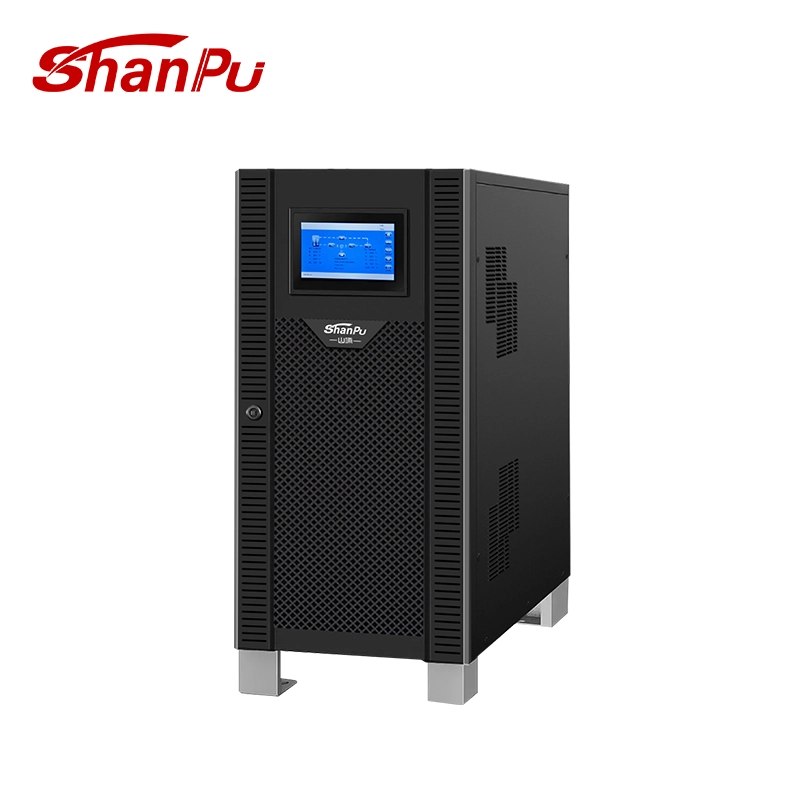
-
ShanPu 3C33 10-800kVA three-phase industrial UPS is a low-frequency UPS with transformer-based online double conversion for factories and plants. Equipment, automation and control loads stay online through grid disturbance and outage with 0ms transfer.
- Rated 10-800kVA with three-phase input and output at 380/400/415Vac, the 3C33 scales from single machines to full production lines. A low-frequency isolation transformer blocks surge, harmonic and common-mode disturbance before reaching PLCs and drives; microprocessor control keeps output within ±1% across a 304-456Vac input window. External VRLA banks size backup time to the process.
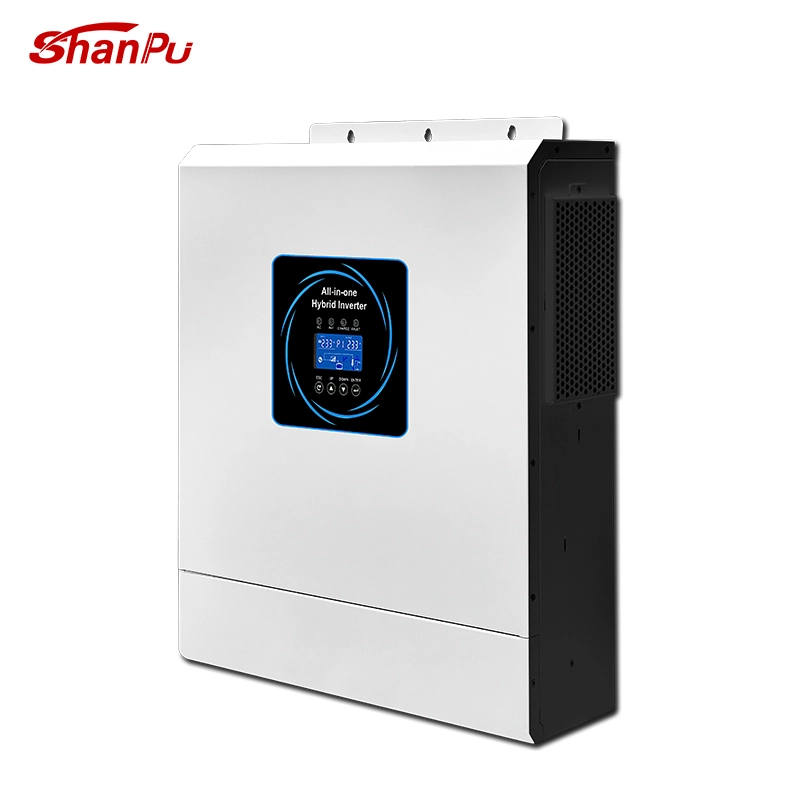
ShanPu SP-12KW/48V is an all-in-one hybrid inverter that integrates dual MPPT solar charging, 48V battery management and dual-output DC-to-AC inversion in one unit for large residential, commercial and light industrial storage systems. Two independent MPPT channels harvest power from separate PV arrays and convert it into regulated 48V DC, charging the battery bank at up to 160A while feeding the inverter stage; the controller automatically selects between solar, utility and battery based on the configured priority mode (SUB / SBU / SUF).The dual AC output design separates critical loads from non-critical circuits, while the 160A MPPT charging current and up to 160A AC charging rapidly recharge 48V battery banks after prolonged cloudy periods or heavy discharge. The 48V architecture reduces line losses and supports higher power delivery, and the Pro model adds parallel expansion plus optional WiFi monitoring for larger projects.
ShanPu SP-3.6KW/24V is an all-in-one hybrid inverter that combines a 100A MPPT solar charger, 24V battery management and DC-to-AC inversion in one compact unit. Built for residential and small commercial systems, it delivers reliable power management with efficient energy conversion and straightforward installation.The inverter supports up to 5000W PV array power with a 60-500Vdc MPPT tracking range and up to 96% peak conversion efficiency from PV to AC. It can also run directly from solar PV or utility without a battery connected, and RS485 communication with automatic lithium battery activation makes LiFePO4 integration straightforward.
ShanPu SP-6.2KW/48V is an all-in-one hybrid inverter that integrates MPPT solar charging, 48V battery management and DC-to-AC inversion into a single unit for medium residential and small commercial storage systems. Solar PV power is processed by the MPPT charger and converted into regulated 48V DC, which simultaneously charges the battery bank and supplies the inverter stage, while the built-in controller automatically selects the energy source - solar, utility or battery - based on the configured operating mode.
© 2026 ShanPu. All Rights Reserved.
YouTube
SHANPU UPS
Shanpu